Storage manager for Mac

See everything on your Mac. Free up space without fear.

MoreRoom maps every file on your disk in seconds, explains what each thing is, and tells you what’s safe to remove. Nothing is deleted without your say — and everything can be undone.

macOS 15 or later · Apple silicon & Intel

Coming soon to the Mac App Store

New in 1.5

What’s new in MoreRoom 1.5.

A security check built on Apple’s own protections, and your Mac at a glance in the menu bar.

Protections

Gatekeeper, System Integrity Protection, FileVault, the firewall, XProtect, security responses, macOS updates and the password after sleep: whether each is on, why it matters, and Open Settings to change it. Sharing services that are on are listed too.

Starts with Your Mac

Login items, background agents, browser extensions, configuration profiles and scheduled tasks, with who signed each one and whether Apple notarized it. Anything unusual is marked “worth a look”, never “malware”, and your own items go to the Trash, with Undo.

Known Threats

A check in a few seconds against Apple’s XProtect definitions, read where macOS keeps them, and MoreRoom’s signed list of known Mac adware and stealers, such as Adload, Pirrit, Shlayer and Atomic Stealer. Removing what it finds is free; a weekly automatic check is Pro.

Privacy

Browser data for each browser and profile — never passwords or bookmarks — recent items, which apps can use your camera, microphone and files, and the Wi-Fi networks your Mac remembers. Seeing it all is free; cleaning several browsers in one click is Pro.

A live menu bar

CPU, memory, network and disk activity drawn live, the busiest apps, connected drives you can eject and accessories with their battery. Show free space, CPU or memory next to the icon if you like.

Internet speed test

Download, upload and latency in about 15 seconds, right from the menu bar, measured with Cloudflare’s speed test servers. It runs only when you click Test, and nothing about your Mac is sent.

A security check, not an antivirus: it looks for what Apple and MoreRoom know about, and no check can promise a Mac is free of every threat.

New in 1.3 and 1.4

  • Quick Scan: what you can free safely right now, in seconds
  • Offload to an external drive, with Bring Back (Pro)
  • Similar Photos, duplicates and Large & Old Files
  • Your cloud files, no sign-in
  • Shortcuts, Siri and Control Center
  • “What is this?” explanations by Apple Intelligence
  • App updates, and the leftovers of apps you trash
  • Disk Tools: cable check, speed history, battery and memory

A Mac App Store edition

The same MoreRoom, made for Apple’s sandbox and updated by the App Store. A few features that need deeper access to macOS aren’t in it.

Coming soon to the Mac App Store

The map

Your whole disk, at a glance.

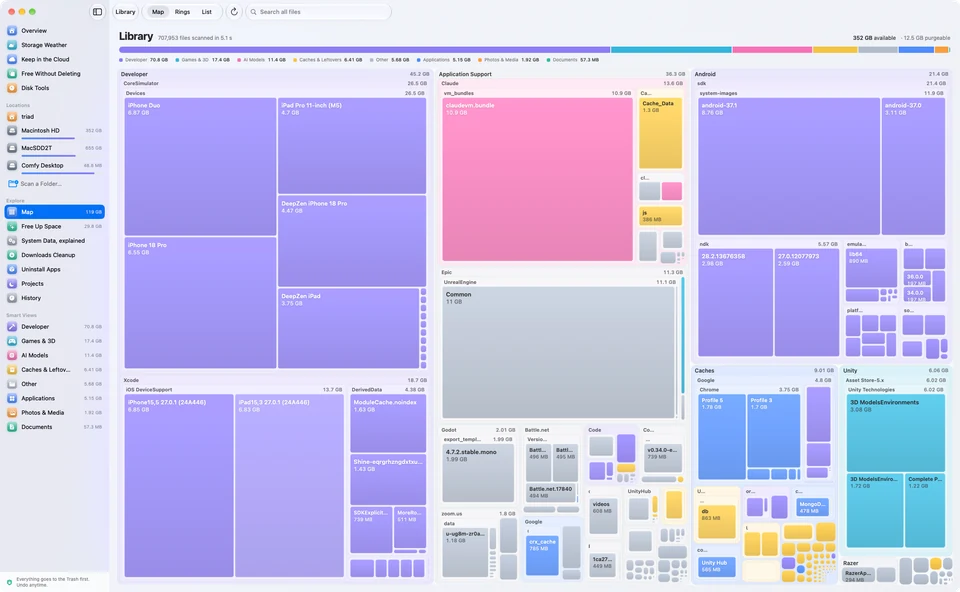
One scan, three synchronised views. Zoom into any folder, click anything to see what it is, when you last used it and whether it will come back.

MoreRoom’s map view: a colour-coded treemap of the Library folder, with iOS simulators, Xcode, Android SDK and caches as large blocks

Treemap

Every file is a block sized by what it really takes on disk. Big things jump out.

Rings

A sunburst of folders inside folders. Perfect to see where the weight sits.

List

Sorted, searchable and precise to the byte, for when you want the numbers.

One colour per kind of thing, everywhere

  • Apps
  • Developer
  • AI models
  • Photos & media
  • Documents
  • System
  • Caches

Only in MoreRoom

Room you didn’t know you had.

Three places where space hides on a Mac — and the calm, safe way to get it back.

Keep in the Cloud

Files already in iCloud Drive, Dropbox, OneDrive or Google Drive don’t need a copy on your Mac. MoreRoom removes the local download — like Finder’s “Remove Download”, but in bulk — and shows the biggest files each service holds, without signing in. Files the cloud doesn’t have yet are never touched.

  • FreeOne folder at a time
  • ProWhole drives in one go

Ghost space

Deleted 50 GB and nothing changed? An app is still holding those files open. MoreRoom shows how much space they keep and which app holds them, and gets it back by quitting that app in one click.

  • FreeIncluded

Ready for the next macOS update?

See at a glance whether there’s room for the next macOS update, and free exactly what’s missing. A calm gauge also shows how much headroom macOS has to stay fast — no scare messages.

  • FreeSee where you stand
  • ProMake room in one click with goal mode

System Data, explained

No more mystery gigabytes.

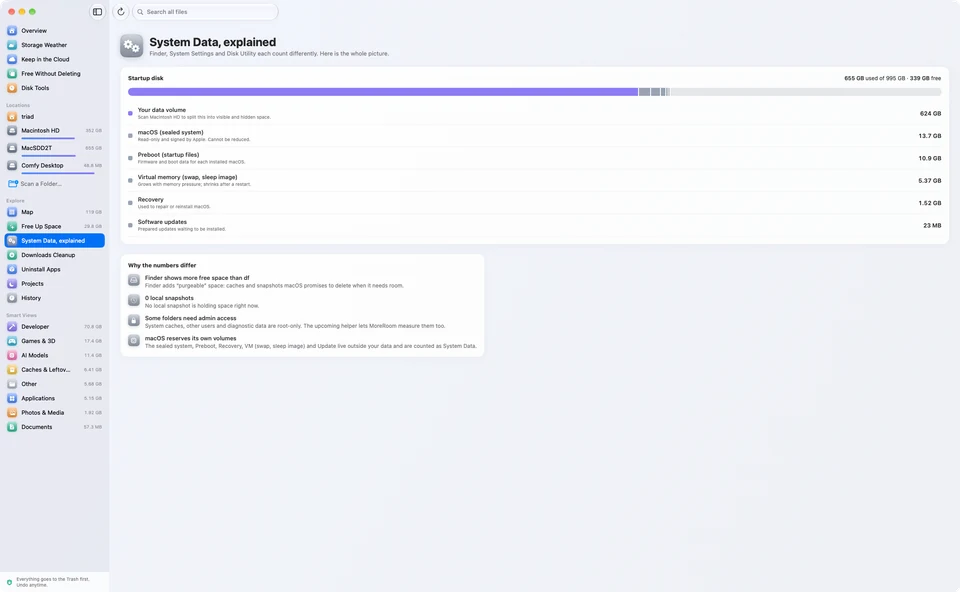
Finder, System Settings and Disk Utility all give you different numbers. MoreRoom shows one honest total and explains every difference.

  • Local snapshots, swap and sleep image, Preboot and Recovery, broken down
  • What macOS will purge on its own, and what it won’t
  • Why Finder shows more free space than Terminal’s df
  • Folders that need admin access, counted and labelled instead of hidden
MoreRoom’s System Data screen: the startup disk split into your files and apps, items needing admin access, the sealed macOS system, Preboot, virtual memory and Recovery

Storage Weather

A forecast for your disk.

MoreRoom remembers how much room you had each day and tells you, calmly, where things are heading — long before you run out.

  • Free space over the last 30 days
  • A forecast of when your disk will be full, if it keeps filling up
  • What grew this week, at a glance

A widget for your desktop

Free space, the trend and what you can free up, without opening the app.

Alerts, only if you want them

Turn on a heads-up before your disk fills up. Rare and useful — never “your Mac is at risk”.

292 rules

It knows the stuff that quietly eats your disk.

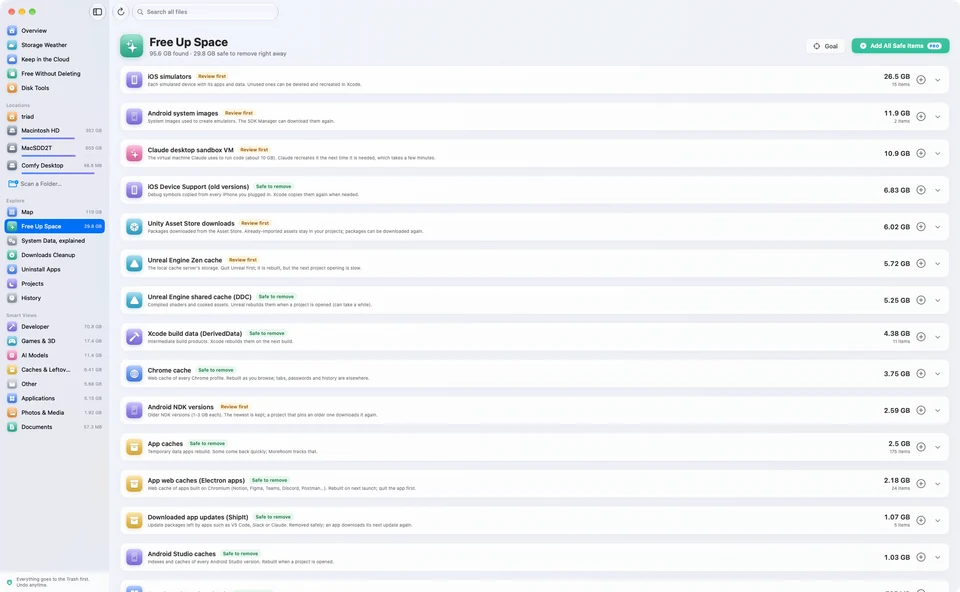
MoreRoom recognises hundreds of well-known space hogs, explains each one in plain language and labels it “Safe to remove” or “Review first”. It even tells you if something will come back.

Developers

  • Xcode simulators, DerivedData & Device Support
  • Android emulators, system images & NDKs
  • node_modules in dormant projects
  • npm, pnpm, Yarn, Bun & Homebrew caches
  • Docker, OrbStack & virtual machine disks
  • Gradle, CocoaPods, Cargo & Go caches

Local AI

  • Ollama & LM Studio models
  • Hugging Face models & datasets
  • ComfyUI models
  • Whisper & PyTorch caches
  • Model weights anywhere (gguf, safetensors…)
  • Old Claude Code, Codex & Gemini CLI history

Creatives

  • Final Cut Pro & iMovie generated files
  • Logic & GarageBand sound libraries
  • Adobe Media Cache & Premiere previews
  • DaVinci Resolve cache & proxies
  • Lightroom Classic previews
  • Very large videos, flagged but never touched

Gamers

  • Steam games & shader cache
  • Epic Games & Unreal Engine versions
  • Unity Library folders
  • Godot project caches
  • Minecraft versions
  • CrossOver & Whisky bottles, kept safe
Safe to remove

Rebuilt automatically when needed.

Review first

Might hold something you care about. We show you what’s inside.

MoreRoom’s Free Up Space list: iOS simulators, Android emulators, app caches, Xcode build data and node_modules folders, each with its size and a safety badge

For every Mac

The clutter you forgot about.

No technical knowledge needed. MoreRoom finds the photos, files, downloads and apps you no longer need, and you decide what goes.

Similar Photos

Finds retakes, bursts and duplicates in your folders and your Photos library, and suggests the best shot. Pictures are compared on your Mac, never uploaded.

Large & Old Files

Your biggest files and the ones you haven’t opened in months, sorted by size or last use. Press Space to preview before you decide.

Downloads Cleanup

Installers of apps you already have, archives you already extracted and files you downloaded twice, all in one list.

Unused apps and leftovers

Apps you haven’t opened in 3 months, and what deleted apps left behind. It’s all free, and everything goes to the Trash, with Undo.

For developers

Built for Macs that build things.

Dependencies, build folders, simulators, toolchains. MoreRoom knows what your tools can rebuild and what they can’t, so you get gigabytes back without breaking a project.

Project hibernation

Not touched a project for 30 days? Hibernate it. node_modules, target, .venv, Pods and other rebuildable folders go to the Trash. Source code, Git history and settings stay put.

  • One click per project (Pro)
  • Wake Up runs each tool’s official install command (free)
  • Undo also works until you empty the Trash
How project hibernation works

Xcode & simulators

DerivedData, Device Support, previews, simulator devices and old runtimes, each sized and explained. You see what Xcode recreates and what it can’t, like Archives.

Android & Flutter

Emulators, system images, NDKs, build-tools, Gradle caches and the Flutter pub cache.

Containers & toolchains

Docker Desktop, OrbStack, Colima and Podman data, nvm and pyenv versions, rustup toolchains, Cargo and Homebrew caches.

Local AI models

Ollama, LM Studio, Hugging Face and ComfyUI models, wherever they sit. Identical copies of a model can share their space as APFS clones (Pro).

Package caches

npm, pnpm, Yarn, Bun, pip, uv, Go and Maven caches, with what each one rebuilds on its own.

Keep it, off your SSD

Move simulators, Xcode data and AI models to an external drive (Pro). Every file is checked, and they come back in one click.

Safe by design

Free up space without fear.

Cleaning apps have earned a bad reputation. MoreRoom is built the other way round: show first, explain, and let you decide.

  • Trash first

    Everything you remove goes to the Trash. Nothing is erased behind your back.

  • Undo, always

    Changed your mind? One click puts it back where it was.

  • You review everything

    MoreRoom never deletes on its own. You see each item, its size and why it’s safe.

  • No scareware

    No red alerts, no fake “junk” counters, no “your Mac is at risk”. Just facts.

  • Nothing leaves your Mac

    Scans run locally. File names and contents are never uploaded anywhere.

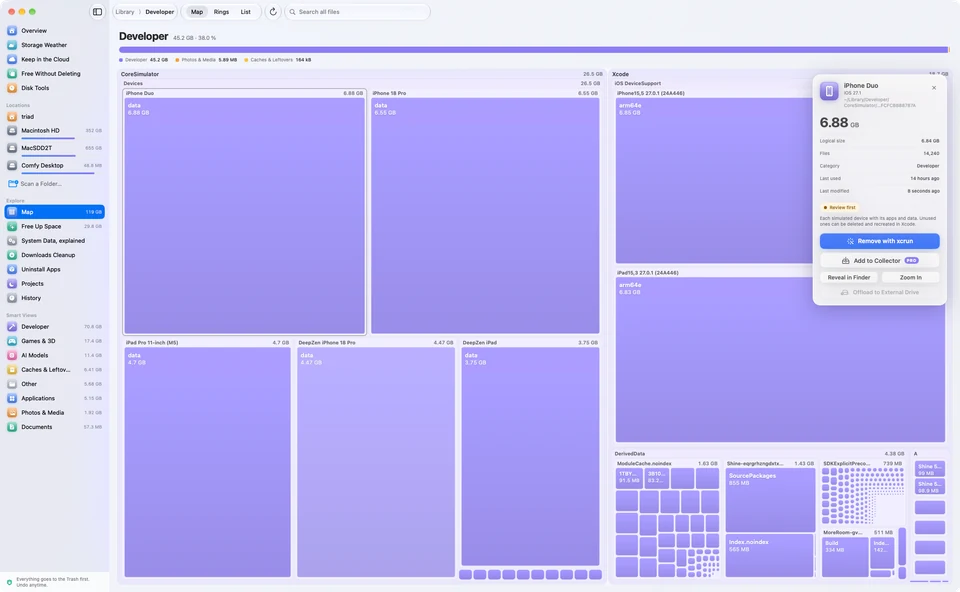
MoreRoom’s inspector for an iOS simulator: its size, file count, last use, a “Review first” badge and a Move to Trash button

Also in MoreRoom

Thoughtful, down to the details.

Free Without Deleting

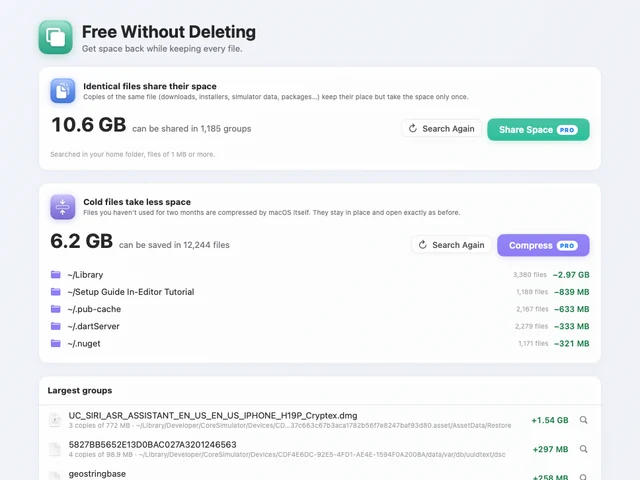
Identical files share their space, like Finder’s Duplicate, or keep one copy and send the others to the Trash. Files unused for two months are compressed by macOS. Finding them is free; doing it all in one go is Pro.

Free Without Deleting

Disk Tools

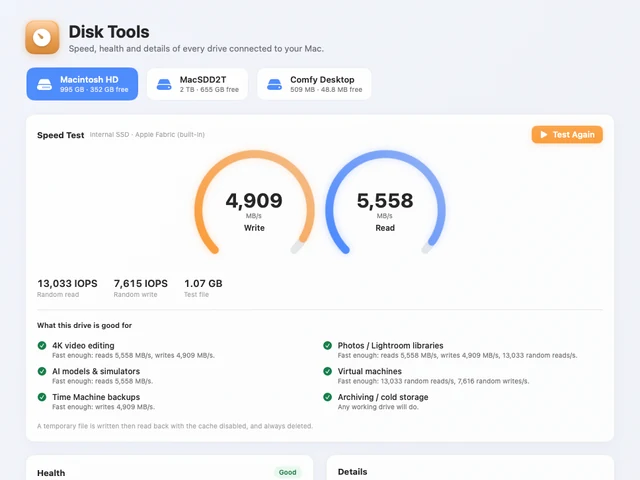
A speed test with plain-language verdicts and a history, a cable and port check, health, details with advice, and a check that changes nothing — for every drive connected to your Mac.

Disk Tools

Uninstall apps, leftovers included

Remove an app with the caches, preferences and support files it leaves behind, in one step you can undo.

Your language, your currency

MoreRoom speaks 41 languages and shows sizes and prices the way your region writes them.

Nothing is scanned until you ask

A calm home screen shows your disks and free space. MoreRoom only looks around when you say so.

Rules that update themselves

New space hogs are recognised as soon as we add them. Every rule update is signed by MoreRoom.

Dark mode and full VoiceOver

At home in light or dark, and every screen works with VoiceOver.

What Is This?

Not sure about a folder? On Macs with Apple Intelligence, MoreRoom explains it in plain words, right on your Mac. It explains; you decide.

MoreRoom Pro

For when you need a lot of room, fast.

Free shows you everything and lets you remove items one by one. Pro does the heavy lifting.

Clean up in one go

Collect items from anywhere — or every item marked “Safe to remove” at once — review them together and free them in one click.

Goal mode

“I need 40 GB.” MoreRoom picks the safest selection and previews it first.

Project hibernation

Inactive projects keep their code but drop what can be rebuilt (node_modules, build folders, Unity Library). Wake them in one click.

Share space, compress cold files

Identical files share their space as APFS clones, and files unused for two months are compressed by macOS. Every file stays in place; compression can be undone.

Offload to an external drive

Move libraries, iPhone backups, simulators and AI models to an external drive using each app’s official method, checked file by file. Bring them back in one click.

Shortcuts & Siri

Free up a set amount using safe items only, or hibernate idle projects, from Shortcuts, Siri or Spotlight. You confirm first, and Undo is in History.

Speed

About a million files in seconds.

A scan engine written close to the metal and a map drawn with Metal. MoreRoom stays smooth even on huge disks.

6.4 sto scan 724,273 files
34 sfor a full 500 GB disk with 3.9 million items
120 Hzzooming and panning, rendered with Metal

Measured on our test Mac with Apple silicon. Your times will vary with your disk and its contents.

Questions

Is MoreRoom really free?

Yes. The free version scans your whole Mac, shows the map, explains System Data and every item it recognises, includes Storage Weather, the widget, alerts and Disk Tools, finds large files and look-alike photos, and lets you uninstall apps and move items to the Trash one at a time. No time limit, no nag screens.

Can MoreRoom delete something important?

MoreRoom never deletes anything on its own. You choose each item, it goes to the Trash first, and you can undo. Items that might hold your data are labelled “Review first” and we show you what’s inside.

Does MoreRoom upload my files or file names?

No. Scans and the Security check happen entirely on your Mac. MoreRoom only talks to our server to activate a Pro licence, to download signed updates to its rules and its list of known threats, and to check for new versions of the app. When you check your apps for updates, it asks the App Store and each app’s developer for version numbers; the Internet speed test, only when you start it, measures against Cloudflare’s servers. Never anything about your files.

Why does it ask for Full Disk Access?

macOS hides some folders (Mail, Messages, other apps’ containers) unless you allow it. With Full Disk Access MoreRoom can measure them; without it, it still works and shows them as “not visible”. It never reads the contents of your documents.

What’s the difference between Pro Yearly and Pro Lifetime?

Same features. Yearly is $19.99 a year and includes updates while it’s active. Lifetime is $39.99 once and includes all future versions, including major ones.

How many Macs can I use?

Up to 3 Macs per licence. You can move a licence from an old Mac to a new one at any time.

Is MoreRoom an antivirus?

No. Its Security screen is a check built on Apple’s own protections: it shows whether they’re on, what starts with your Mac and who signed it, and what matches Apple’s XProtect definitions or MoreRoom’s list of known Mac adware and stealers. It doesn’t scan every file in the background, and no check can promise a Mac is free of every threat.

Which Macs are supported?

Any Mac running macOS 15 Sequoia or later, with Apple silicon or Intel.

Is MoreRoom a good alternative to CleanMyMac or DaisyDisk?

MoreRoom combines a visual disk map with plain explanations and safe cleanup. It tells you what each item is, labels it “Safe to remove” or “Review first”, and moves everything to the Trash, with Undo. It’s free to see everything and remove items one at a time.

Can MoreRoom clean Xcode, Docker and node_modules?

Yes. It recognises Xcode DerivedData, simulators and Device Support, Android emulators, Docker Desktop, OrbStack and Colima data, package caches and node_modules, and tells you what each tool can rebuild. Project hibernation (Pro) clears the rebuildable folders of a project you haven’t touched for 30 days, and Wake Up (free) brings them back with the official install command.

Can MoreRoom remove local AI models from Ollama or LM Studio?

Yes. It finds models from Ollama, LM Studio, Hugging Face and ComfyUI, and model weights anywhere on your Mac, such as gguf and safetensors files. You see what each takes, then remove it or move it to an external drive (Pro).

Can MoreRoom find duplicate photos and large files?

Yes. Similar Photos finds retakes, bursts and duplicates in your folders and your Photos library, compared on your Mac. Large & Old Files lists your biggest and forgotten files. Handling one photo group or one file at a time is free; Pro handles several at once.

Key facts

What it is
A native storage manager for macOS. It maps your disk, explains what each item is, and frees up space safely.
Developer
Yando Pte. Ltd., Singapore
Requirements
macOS 15 Sequoia or later, on Apple silicon and Intel Macs
Price
Free. Pro costs $19.99 a year or $39.99 once (also €19.99 / £19.99 a year or €39.99 / £39.99 once), for up to 3 Macs.
Editions
Direct download from moreroom.app, or the Mac App Store edition, which runs in Apple’s sandbox. In the App Store edition, Pro is bought through Apple: $19.99 a year or $49.99 once.
Privacy
Scans run on your Mac. File names and contents are never uploaded.
Safety
Nothing is deleted without your approval. Items go to the Trash first, with Undo.
Refunds
Full refund within 30 days, no questions asked.
Latest version
1.5.1, released October 18, 2026
Languages
41, including English, Chinese, Spanish, Arabic, Hindi, French and Japanese
Make some room.

Download MoreRoom for free and see what’s really on your Mac in under a minute.

macOS 15 or later · Apple silicon & Intel