In short
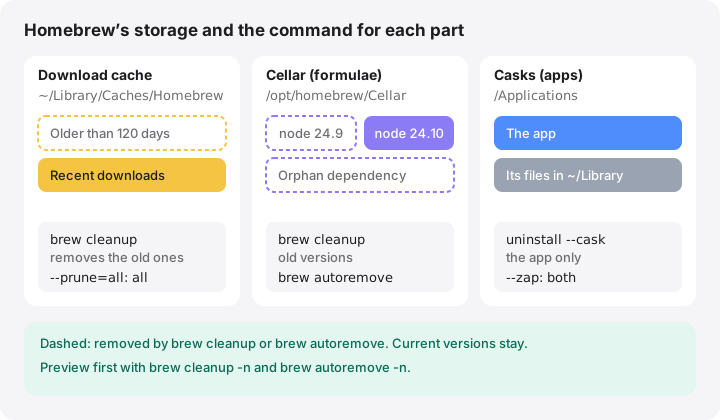
- brew cleanup removes old versions of installed formulae, stale lock files and downloads older than 120 days by default.
- brew cleanup --prune=all also removes every cached download regardless of age; run brew cleanup -n first to preview.
- brew autoremove uninstalls dependencies that no installed formula needs any more.
- Homebrew lives in /opt/homebrew on Apple silicon and /usr/local on Intel Macs; its download cache is in ~/Library/Caches/Homebrew.
- brew uninstall --zap removes a cask app with its settings and support files, which may include files shared with other apps.
How to clean up Homebrew on a Mac
- Measure Homebrew’s footprint. Run du -sh "$(brew --cache)" for the download cache and du -sh "$(brew --cellar)" for installed formulae.
- Preview the cleanup. Run brew cleanup -n to list what would be removed and how much space it would free, without deleting anything.
- Run the cleanup. Run brew cleanup to remove old versions and old downloads, or brew cleanup --prune=all to empty the download cache entirely.
- Remove orphaned dependencies. Run brew autoremove -n to preview, then brew autoremove to uninstall dependencies no other formula needs.
- Uninstall what you no longer use. Run brew leaves --installed-on-request to see what you installed yourself, then brew uninstall the ones you no longer need.
- Check for problems. Run brew doctor to confirm the installation is healthy after cleaning up.
Homebrew keeps old versions of what you upgrade and a cache of what it downloads, so it slowly grows. brew cleanup removes old versions and downloads older than 120 days; brew cleanup --prune=all empties the download cache entirely; brew autoremove uninstalls dependencies nothing needs any more. All three are official commands, and none of them touches the current version of anything you use.
Commands and defaults below are from the Homebrew manual as of October 2026 (Homebrew 7).
Where Homebrew keeps its files
| What | Apple silicon | Intel |
|---|---|---|
Prefix (brew --prefix) |
/opt/homebrew |
/usr/local |
Installed formulae (brew --cellar) |
/opt/homebrew/Cellar |
/usr/local/Cellar |
Casks (brew --caskroom) |
/opt/homebrew/Caskroom |
/usr/local/Caskroom |
Download cache (brew --cache) |
~/Library/Caches/Homebrew |
~/Library/Caches/Homebrew |
macOS 27 Golden Gate runs only on Apple silicon, so new installations use /opt/homebrew. Intel Macs, which stay on macOS 26 Tahoe or earlier, keep using /usr/local. A Mac migrated from an Intel model can have both; brew --prefix tells you which one is active.
Cask apps themselves are installed in /Applications, like any other app.
Measure before you clean
du -sh "$(brew --cache)"
du -sh "$(brew --cellar)"
du -sh "$(brew --cellar)"/* | sort -h | tail -20
The first two lines show the size of the download cache and of all installed formulae. The third lists the 20 largest formulae. Each folder inside the Cellar contains one subfolder per installed version, so brew list --versions shows which formulae have more than one.
brew cleanup: what it removes and what it keeps
brew cleanup -n
brew cleanup
brew cleanup -n (or --dry-run) lists every file it would remove and ends with an estimate of the space it would free. Nothing is deleted. Plain brew cleanup then:
- removes old versions of installed formulae, keeping the current one;
- removes stale lock files and outdated downloads for formulae and casks;
- removes any download older than 120 days.
HOMEBREW_CLEANUP_MAX_AGE_DAYSchanges that number.
By default it also removes dependencies that are no longer needed, the same as brew autoremove, unless you set HOMEBREW_NO_AUTOREMOVE.
To clean only one formula or cask, name it: brew cleanup node.
Going further with –prune
brew cleanup --prune=all
--prune takes a number of days and removes all cache files older than that; --prune=all removes them regardless of age. -s (--scrub) also removes downloads for the latest versions, but still keeps the downloads of formulae and casks currently installed. Homebrew’s own help notes that rm -rf "$(brew --cache)" removes even those. The cache only holds downloads, so any of these is safe; Homebrew downloads again what it needs.
All of these deletions are permanent: nothing goes to the Trash.
Automatic cleanup
Homebrew already cleans up after itself to a degree. After brew install, brew upgrade and brew reinstall, it runs a cleanup for the formulae involved, and every 30 days (HOMEBREW_CLEANUP_PERIODIC_FULL_DAYS) for everything. If you set HOMEBREW_NO_INSTALL_CLEANUP in your shell profile, that never happens, which explains a Cellar full of old versions. Remove the variable or run brew cleanup yourself from time to time. To protect specific formulae, list them in HOMEBREW_NO_CLEANUP_FORMULAE.
Remove dependencies nothing needs
When you uninstall a formula, the libraries it pulled in can stay behind.
brew autoremove -n
brew autoremove
brew autoremove uninstalls formulae that were installed only as dependencies and are no longer needed by anything. The -n version shows the list first.
Uninstall what you no longer use
brew leaves --installed-on-request
brew uninstall <formula>
brew leaves lists formulae that nothing else depends on, and --installed-on-request (-r) limits the list to those you installed yourself. That is usually the shortest list to review. Uninstalling a formula removes it from the Cellar for good; reinstalling downloads it again.
Casks and –zap
brew uninstall --cask <cask>
brew uninstall --zap <cask>
A normal uninstall removes the app. --zap also removes the files the cask definition lists as belonging to the app, such as preferences, caches and support folders in ~/Library. The Homebrew manual warns that it may remove files shared between applications, so use it for apps you are sure you want gone with their settings. For apps not installed with Homebrew, see how to uninstall Mac apps completely.
Before uninstalling, check what depends on it
brew uses --installed <formula>
This lists the installed formulae and casks that need the one you are about to remove. If the list is not empty, Homebrew refuses to uninstall it unless you add --ignore-dependencies, which can break those packages. It is usually better to leave shared libraries alone and let brew autoremove collect them once nothing needs them.
Why Homebrew can stay large after a cleanup
A cleanup removes leftovers, not the packages you use. Toolchains, compilers and large frameworks are big by nature, and each one can pull in dozens of dependencies. If the Cellar is still large, the third du command above shows which formulae dominate. Uninstall the ones you no longer need, then run brew autoremove so their dependencies follow.
Check the result
brew doctor
brew doctor checks your installation for potential problems and exits with an error if it finds any. Most warnings are informational, but it is a good final step after a cleanup or after migrating to a new Mac.
How MoreRoom helps
MoreRoom’s free version recognises Homebrew’s download cache and Cellar and shows their size. The download cache is marked “Safe to remove” and the Cellar “Review first”. When you clean either one, MoreRoom runs Homebrew’s own brew cleanup --prune=all, which removes old versions and cached downloads but never the packages you use. That command is permanent and labelled as such. MoreRoom does not uninstall formulae or casks for you; use brew uninstall for that.
Pro adds the Collector, to clean several items in one go, and Goal mode, which picks the safest selection for the space you need.
Frequently asked questions
Is brew cleanup safe?
Yes. It removes only old versions of formulae that have a newer version installed, stale lock files and old cached downloads. Current versions of everything you installed stay in place and keep working.
Does Homebrew clean up automatically?
Partly. After brew install, upgrade or reinstall it cleans up the formulae involved, and every 30 days it runs a full cleanup. Setting HOMEBREW_NO_INSTALL_CLEANUP turns this off.
Can I delete ~/Library/Caches/Homebrew?
Yes. It only holds downloads, and Homebrew fetches them again if needed. brew cleanup --prune=all is the tidy way; Homebrew’s own help mentions rm -rf "$(brew --cache)" to remove even the downloads for installed packages.
What is the difference between brew autoremove and brew cleanup?
brew cleanup removes old versions and cached downloads of things you still use. brew autoremove uninstalls whole formulae that were installed only as dependencies and are no longer needed by anything.
Where is Homebrew installed on my Mac?
In /opt/homebrew on Macs with Apple silicon and in /usr/local on Intel Macs. Run brew --prefix to see yours.